Early last month, our vendor sent us a copy of PRAGMATA for technical evaluation. It turned out to be an unusually revealing validation target for RenderDoc Pro: a production-class D3D12 renderer built around GPU-driven submission, large transient resource sets, compute-heavy scheduling, specialised hair shading, and an HDR presentation path.
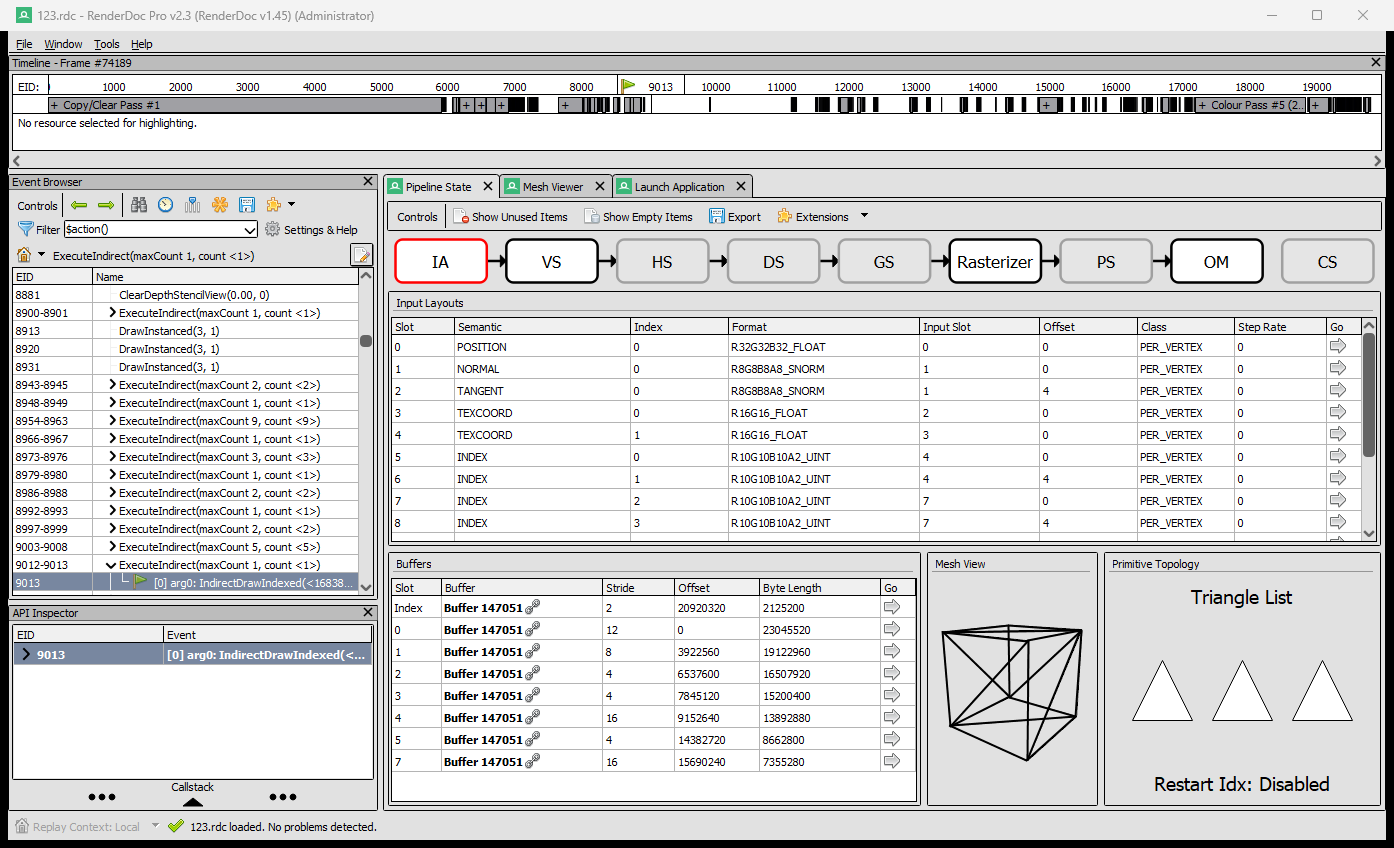
The value of a graphics debugger is measured at the edge of compatibility. On the same test system, the upstream RenderDoc build crashed while attempting to capture or replay this workload. RenderDoc Pro completed the capture, opened the resulting 4.89 GB frame, and kept the entire pipeline inspectable—from ExecuteIndirect arguments and multi-stream geometry to layered hair OIT, HDR scene colour, and the final composite.
What follows is not a screenshot tour. It is a frame-level demonstration of how RenderDoc Pro turns a demanding, production-grade renderer into concrete engineering data.
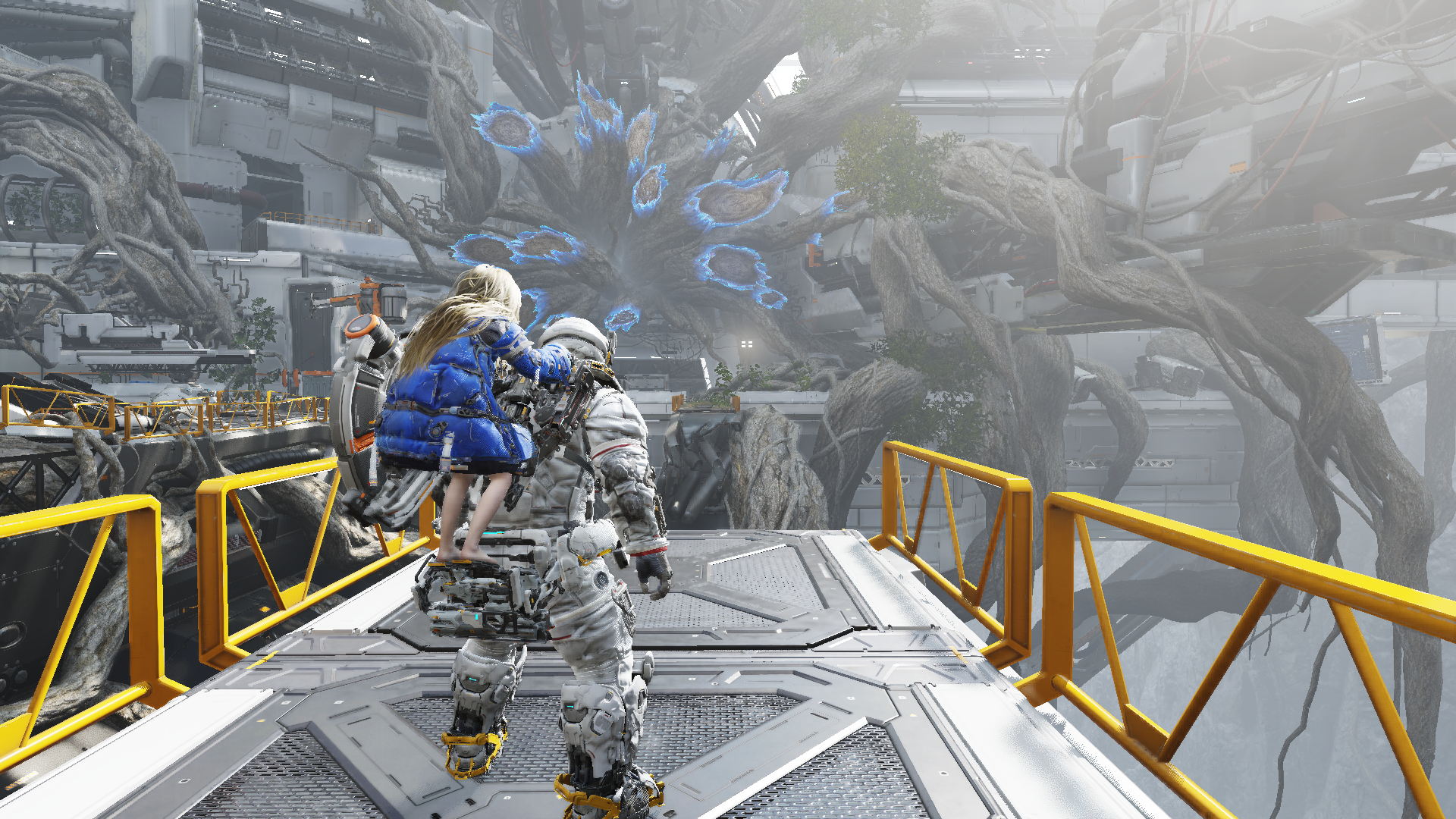
Table of Contents
- Why this capture needed RenderDoc Pro
- Frame overview
- GPU-driven submission and ExecuteIndirect
- Depth, skinning, and geometry extraction
- A compute-heavy frame
- Hair rendering with layered OIT
- HDR scene colour and the final composite
- What this means for production graphics work
1. Why This Capture Needed RenderDoc Pro
PRAGMATA is not a simple forward-rendered application with a short list of conventional draws. The captured frame is a modern D3D12 workload built around large resource pools, indirect command submission, extensive compute work, specialised character shading, multiple intermediate targets, and a sizeable transient working set.
Injection alone is not the hard part. A capture tool must preserve command-list behaviour, resource states, descriptor access, indirect argument buffers, and the replay-time relationships between thousands of resources. It must then rebuild those relationships without destabilising the application or the replay process. On this workload, the original RenderDoc build crashed on our system. RenderDoc Pro was able to capture the frame, replay it locally, and keep the pipeline state, mesh viewer, API inspector, and resource inspection tools available.
2. Frame Overview
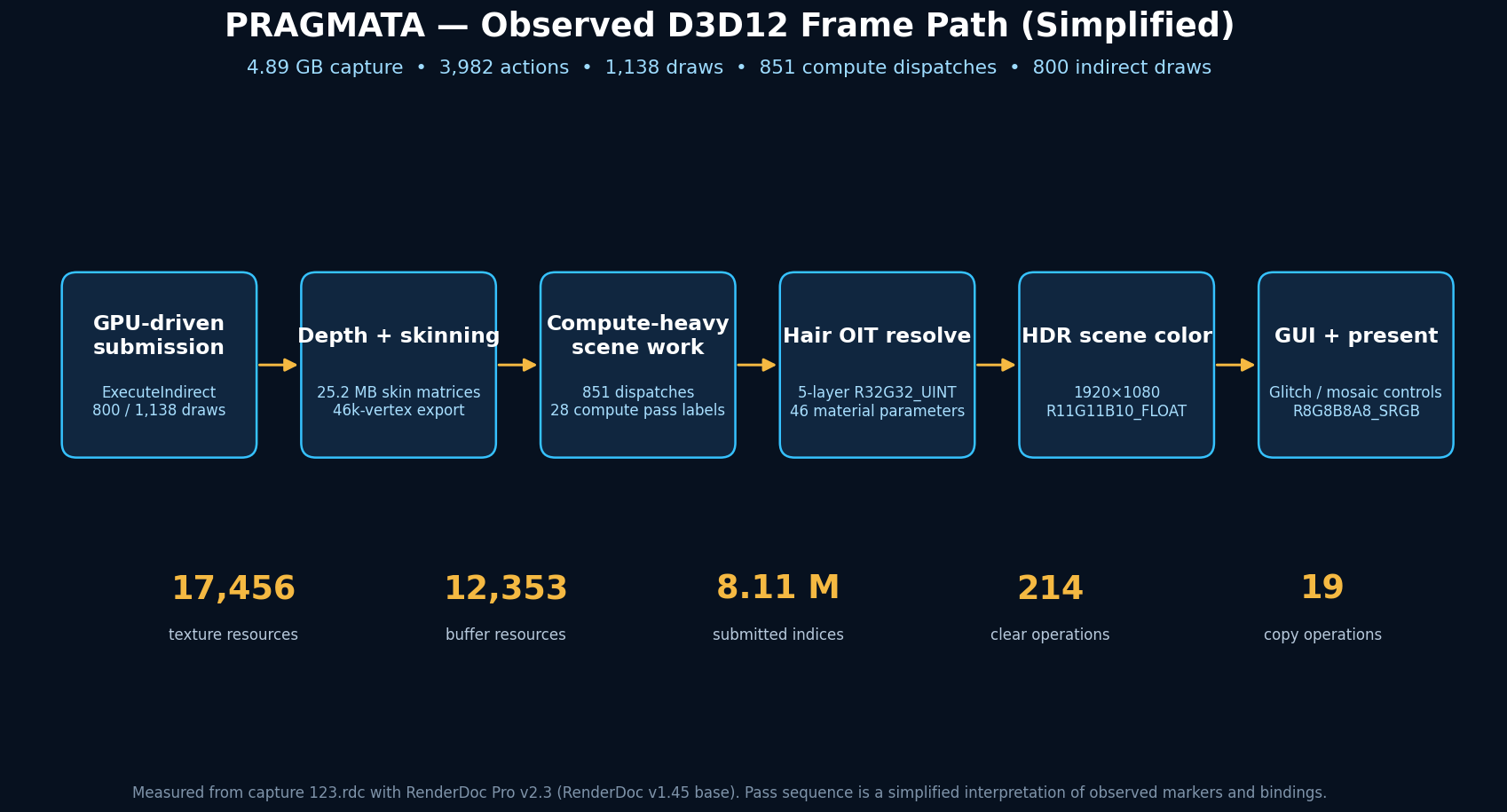
The captured frame was recorded at 1920×1080 using Direct3D 12. The top-level numbers immediately show why a reliable replay matters:
| Frame metric | Measured value |
|---|---|
| Capture size | 4.89 GB |
| Total GPU actions | 3,982 |
| Draw calls | 1,138 |
| Compute dispatches | 851 |
| Clear operations | 214 |
| Copy operations | 19 |
| Marker operations | 900 |
| Texture resources visible to the replay | 17,456 |
| Buffer resources visible to the replay | 12,353 |
Resource counts in a capture include transient allocations, aliases, history buffers, streaming resources, and objects that may only be active for part of the frame. They should not be read as “17,456 unique art textures”. They do, however, describe the scale of the state graph that the debugger must preserve and make navigable.
3. GPU-Driven Submission and ExecuteIndirect
The most obvious architectural signal is the heavy use of ExecuteIndirect. Of the 1,138 draw calls in the frame, 800 are indirect. All 1,138 draws are instanced, and 859 use index buffers. Across the frame, draw actions submit approximately 8.11 million indices.
This is consistent with a renderer that moves visibility and draw selection work onto the GPU. Compute passes prepare counters and argument buffers; D3D12 then consumes those buffers without requiring the CPU to issue every object draw individually. The capture contains repeated indirect dispatches with workloads such as 2,317×1×1 and 4,671×1×1, followed by indirect indexed draws. It is a practical way to scale scene complexity, but it makes debugging harder: the command visible in the API stream is only the final consumer of data generated earlier in the frame.
RenderDoc Pro makes that chain inspectable. An engineer can stop at an expanded indirect child action, inspect the resolved arguments, identify the bound index and vertex streams, follow the shader resources, and then move backwards to the compute work that produced the arguments.
4. Depth, Skinning, and Geometry Extraction
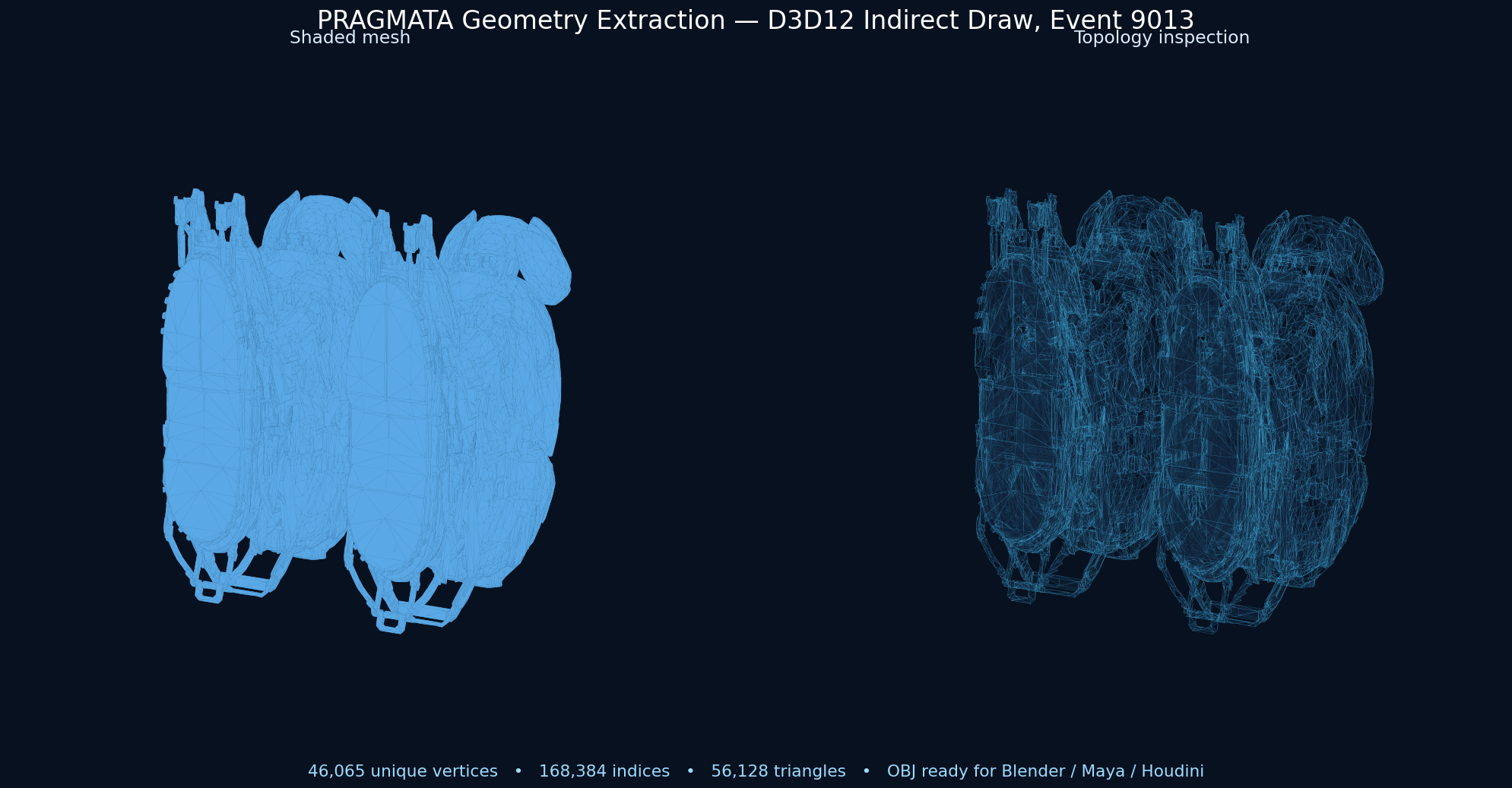
Event 9013 is one of the largest draws in the frame: an indirect, indexed, instanced triangle-list draw with 168,384 indices. It writes depth at 1920×1080 and binds a vertex shader that reads a 25,165,824-byte SkinningMatrices buffer and a 1,280,000-byte InstanceWorldInfo buffer.
The input assembler is equally instructive. Position data is stored as R32G32B32_FLOAT; normals and tangents use compact signed-normalised formats; UVs use 16-bit floating point; and four packed index/weight-style channels use R10G10B10A2_UINT. Multiple logical streams are subranges of one large buffer allocation, while the index stream uses 16-bit indices at a separate offset in the same allocation.
We exported this draw from the capture as a standard OBJ. The extracted object contains 46,065 unique position vertices, 168,384 indices, and 56,128 triangles. The file can be opened in Blender, Maya, Houdini, MeshLab, or any other OBJ-capable DCC package for topology inspection. Because this export uses input-assembler positions, it represents the submitted source geometry rather than a reconstructed screenshot mesh.
The scene constant buffer reinforces the impression of a production renderer. Its 628 bytes expose 27 reflected variables, including current and previous view-projection matrices, inverse matrices, projection-space jitter, near and far planes, a GPU-visible mask, resolution-ratio data, VRS velocity thresholds, a blue-noise jitter index, and ray-tracing parameters. Even without source code, the reflected interface tells us which systems need to exchange data at this point in the frame.
5. A Compute-Heavy Frame
The capture contains 851 dispatches—an unusually high count relative to 1,138 draws. RenderDoc’s generated grouping identifies at least 28 compute-pass regions, alongside 14 copy/clear groups and 11 colour-pass groups.
A dispatch count alone cannot identify the exact algorithm, and it would be irresponsible to assign every pass a fashionable label. What the capture does prove is that major parts of the frame are expressed as compute rather than fixed-function raster work. The dispatches sit around resource clears, indirect argument generation, scene rendering, and full-screen resolves. That pattern is compatible with GPU culling, compacted work generation, lighting preparation, post-processing, temporal reconstruction, and specialised material systems.
The important debugging advantage is correlation. Instead of treating “compute” as a black box, RenderDoc Pro allows each dispatch to be tied to its compute shader, UAVs, SRVs, constants, thread-group dimensions, and the later draw or composite that consumes its results.
6. Hair Rendering with Layered OIT
The clearest specialised subsystem appears at event 17159. A full-screen resolve reads an OITSRVs texture array with five 1920×1080 slices in R32G32_UINT, together with a separate resolved R32G32_UINT texture. The pass writes into the HDR scene-colour path while keeping the main depth target bound.
The associated 224-byte hair material constant block exposes 46 parameters. Reflected names include:
- index of refraction and cuticle tilt angle;
- primary, azimuthal, and tip roughness;
- absorption coefficients for the body and tip;
- fake multiple-scattering and backscatter controls;
- strand minimum, maximum, and rendering widths;
- root blending, shadow density, transparency, and lighting limits;
- segment count, shading LOD, and indirect-lighting multipliers.
That is not a generic alpha-blended material. It is a dedicated strand/hair shading model coupled to a layered order-independent transparency resolve. The five-layer integer OIT storage provides a bounded per-pixel representation that can be sorted or reconstructed during the resolve, avoiding the most obvious ordering failures of conventional alpha blending.
7. HDR Scene Colour and the Final Composite
The hair resolve writes to a 1920×1080 R11G11B10_FLOAT render target. This packed floating-point format is a common fit for HDR scene colour because it retains a wide luminance range at four bytes per pixel. We exported that target directly from the capture and applied an offline display transform to produce Figure 1; it is not a desktop screenshot.
Later in the frame, the GUI path moves into a conventional sRGB target. One inspected GUI draw samples a 2048×128 BC1_SRGB texture and a 512×512 BC1_SRGB “glitch” texture. Its reflected user-material constants include RGB channel controls, UV offset, colour shift, mosaic controls, and a glitch parameter. The same stage also exposes checkerboard and resolution-ratio constants, evidence that the final presentation path is designed to coexist with scalable rendering and reconstruction features.
This separation—floating-point scene work first, display-oriented composite later—is exactly what we expect from a modern professional-grade pipeline. It lets lighting, transparency, and post-processing operate in HDR space before the image is converted for presentation and overlaid with user-interface elements.
8. What This Means for Production Graphics Work
A capture like this is useful well beyond curiosity. A rendering engineer can inspect indirect argument generation, verify resource transitions, compare the depth and colour versions of a draw, and identify oversized or unexpectedly persistent resources. A technical artist can export geometry, inspect topology in a DCC tool, trace a material to its textures, and verify which parameters reach the shader. A performance engineer can measure pass timing, group expensive dispatches, and distinguish scene work from presentation or UI cost.
Most importantly, none of those workflows matter if the application or replay crashes before the frame becomes inspectable. PRAGMATA is a good example of why compatibility is a feature, not a footnote. RenderDoc Pro preserved a large D3D12 workload that the stock build could not handle on our test system, then exposed enough of the live pipeline to turn a 4.89 GB capture into actionable engineering data—and even a portable OBJ asset.
Conclusion
PRAGMATA’s frame is built like a contemporary high-end renderer: GPU-driven submission, extensive compute processing, compact multi-stream geometry, explicit temporal and visibility controls, a specialised layered hair solution, HDR intermediate colour, and a separate presentation composite. The value of RenderDoc Pro is not merely that it can take a screenshot of this workload. It can keep the capture stable, replay the frame, and expose the relationships between commands, buffers, shaders, textures, and final pixels.
For more capture studies and practical workflows, visit the RenderDoc Pro Tutorials.
Legal Notice
Only inspect software that you own or are authorised to debug. Users remain responsible for applicable laws, licence terms, platform policies, and confidentiality obligations. PRAGMATA and related trademarks and assets belong to their respective owners. This independent technical analysis does not imply endorsement by the game publisher, the hardware vendor, Microsoft, or any other third party.
RenderDoc Pro is an independent commercial fork based on RenderDoc under the MIT License. Original copyright notices and third-party acknowledgements remain applicable.